KRIGOLSON TEACHING
  • NEUROSCIENCE
    • NEUROSCIENCE 100 >
      • NEURO 100 INTRODUCTION
      • NEURO 101 ADVANCED
      • NEURO 102 AGING
      • NEURO 103 MEMORY
      • NEURO 104 DECISION MAKING
      • NEURO 105 LEARNING
      • Research Statistics
    • NRSC 500B / MEDS 470
  • Kinesiology
    • EPHE 245
    • EPHE 357
  • STATISTICS
    • BIOMEDICAL STATISTICS
    • MULTIVARIATE STATISTICS >
      • MULTIPLE REGRESSION
    • RESOURCES
    • R TIPS
  • MATLAB
    • THE BASICS >
      • Hello World
      • BASIC MATHEMATICS
      • VARIABLES
      • Matrices
      • Writing Scripts
      • PATHS AND DIRECTORIES
      • USER INPUT
      • FOR LOOPS
      • WHILE LOOPS
      • IF STATEMENTS
      • RANDOM NUMBERS
    • STATISTICS >
      • LOADING DATA
      • DESCRIPTIVE STATISTICS
      • MAKING FUNCTIONS
      • BAR GRAPHS
      • LINE GRAPHS
      • TTESTS
    • EXPERIMENTS: THE BASICS >
      • DRAWING A CIRCLE
      • DRAWING MULTIPLE OBJECTS
      • DRAWING TEXT
      • DRAWING AN IMAGE
      • PLAYING A TONE
      • KEYBOARD INPUT
      • BUILDING A TRIAL
      • BUILDING TRIALS
      • NESTED LOOPS
      • RIGHT OR WRONG
      • SAVING DATA
    • EXPERIMENTS: ADVANCED >
      • STROOP
      • N BACK
      • Oddball
      • Animation
      • VIDEO
    • EEG and ERP Analysis >
      • ERP Analysis
      • FFT Analysis
      • Wavelet Analysis
    • MATLAB TOOLS
  • Directed Studies
    • Advanced Topics in Motor Control A
    • Advanced Topics in Motor Control B
    • An Introduction to EEG
    • Advanced EEG and ERP Methods
    • Neural Correlates of Human Reward Processing
    • Independent Research Project
  • RESOURCES
    • EXCEL
    • HOW TO READ A RESEARCH PAPER
    • HOW TO WRITE A RESEARCH PAPER
  • Workshops
    • Iowa State EEG Workshop 2018
  • Python
    • The Basics >
      • Setting Up Python
      • Hello, world!
      • Basic Math & Using Import
      • Variables
      • Matrices
      • Scripts
      • User Input
      • For Loops

Variables

So far, we have been using Python only as a large calculator. Now, we want to make variables, which can store the results of our math. We can assign a name and a value to a variable, and then manipulate it.

Try the following in the console:
x = 2
x = x + 2
x


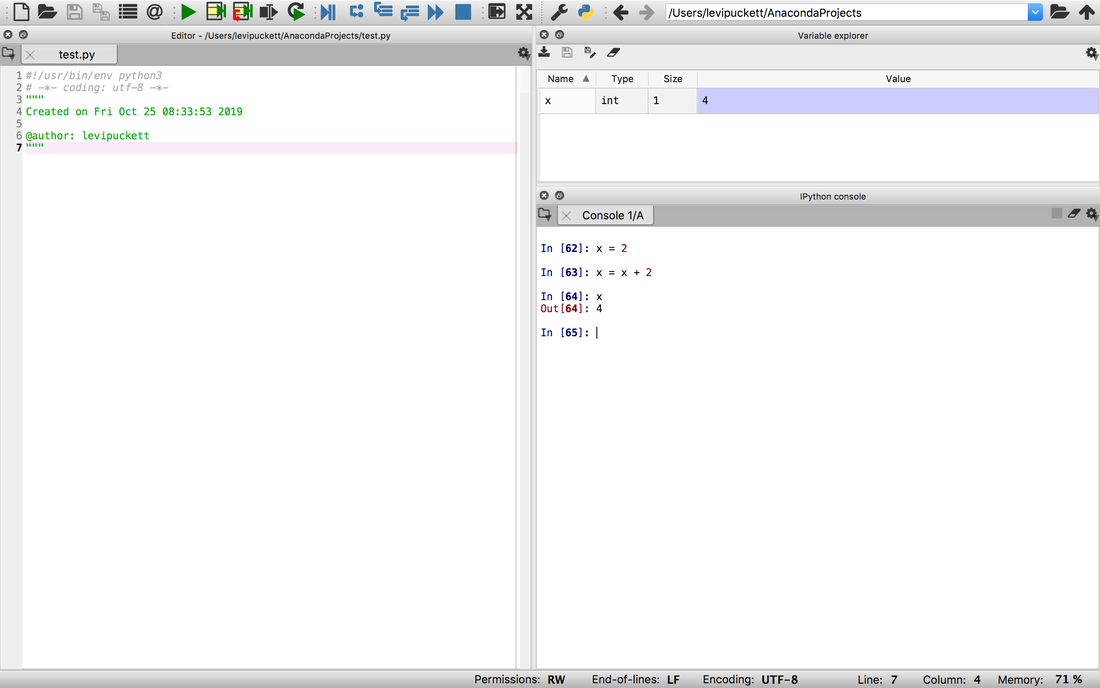
You will see the following output:
Picture
Keep your eye on the variable explorer above the console while you input each line. Notice how the value of x is updated. First, we create a variable and assign it the value 2. Next, we say x gets itself (2) + 2, so now x = 4. Finally, typing x displays the value of x on the console.

Now let's use variables to calculate something useful! Let's say we have a right-angle triangle with legs length 4 and 6. We want to find the length of the hypotenuse using the Pythagorean theorem. Let's do that using the math module and variables.

import math #
​
a = 6
b = 4
c = math.sqrt(a**2 + b**2)

c

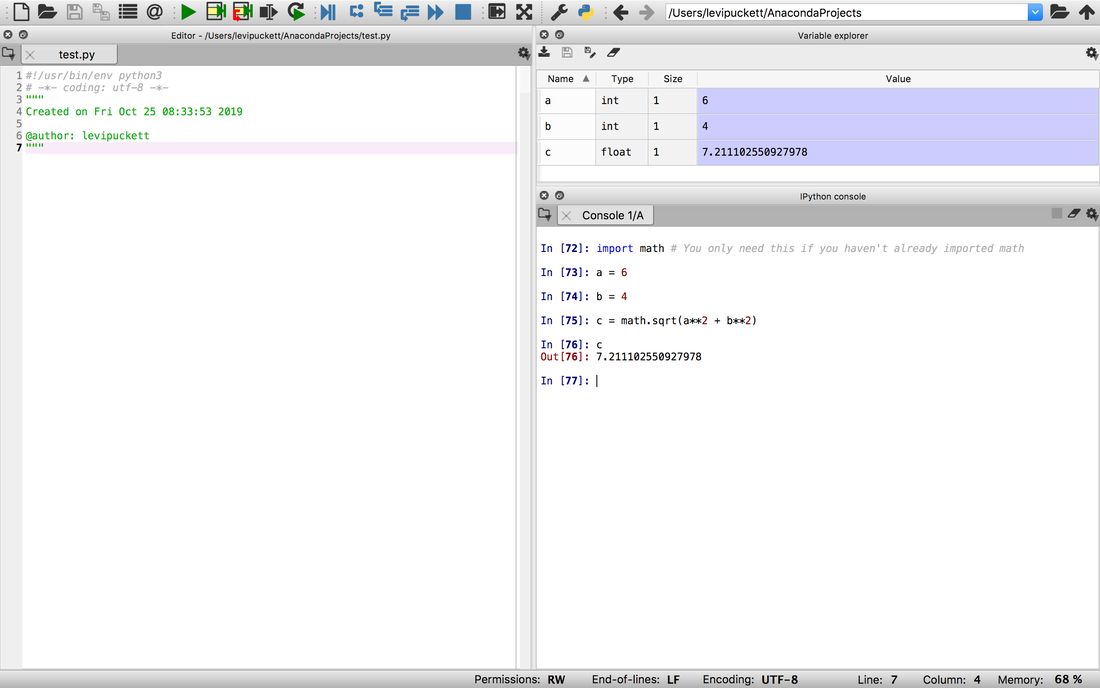
You should see the following. Note that c has the value 7.2 in the variable explorer as well.
Picture
Quick note: notice the text after the # symbol is greyed out? That's called a comment. Comments are ignored entirely by Python, and are only there to help the humans reading the code. When you write code whose functionality isn't immediately clear, adding a comment or two can help a lot for the next person who has to read it.

Play around more with variables. Once you're comfortable, let's move on to the next tutorial where we will use a new module to work with matrices.
  • NEUROSCIENCE
    • NEUROSCIENCE 100 >
      • NEURO 100 INTRODUCTION
      • NEURO 101 ADVANCED
      • NEURO 102 AGING
      • NEURO 103 MEMORY
      • NEURO 104 DECISION MAKING
      • NEURO 105 LEARNING
      • Research Statistics
    • NRSC 500B / MEDS 470
  • Kinesiology
    • EPHE 245
    • EPHE 357
  • STATISTICS
    • BIOMEDICAL STATISTICS
    • MULTIVARIATE STATISTICS >
      • MULTIPLE REGRESSION
    • RESOURCES
    • R TIPS
  • MATLAB
    • THE BASICS >
      • Hello World
      • BASIC MATHEMATICS
      • VARIABLES
      • Matrices
      • Writing Scripts
      • PATHS AND DIRECTORIES
      • USER INPUT
      • FOR LOOPS
      • WHILE LOOPS
      • IF STATEMENTS
      • RANDOM NUMBERS
    • STATISTICS >
      • LOADING DATA
      • DESCRIPTIVE STATISTICS
      • MAKING FUNCTIONS
      • BAR GRAPHS
      • LINE GRAPHS
      • TTESTS
    • EXPERIMENTS: THE BASICS >
      • DRAWING A CIRCLE
      • DRAWING MULTIPLE OBJECTS
      • DRAWING TEXT
      • DRAWING AN IMAGE
      • PLAYING A TONE
      • KEYBOARD INPUT
      • BUILDING A TRIAL
      • BUILDING TRIALS
      • NESTED LOOPS
      • RIGHT OR WRONG
      • SAVING DATA
    • EXPERIMENTS: ADVANCED >
      • STROOP
      • N BACK
      • Oddball
      • Animation
      • VIDEO
    • EEG and ERP Analysis >
      • ERP Analysis
      • FFT Analysis
      • Wavelet Analysis
    • MATLAB TOOLS
  • Directed Studies
    • Advanced Topics in Motor Control A
    • Advanced Topics in Motor Control B
    • An Introduction to EEG
    • Advanced EEG and ERP Methods
    • Neural Correlates of Human Reward Processing
    • Independent Research Project
  • RESOURCES
    • EXCEL
    • HOW TO READ A RESEARCH PAPER
    • HOW TO WRITE A RESEARCH PAPER
  • Workshops
    • Iowa State EEG Workshop 2018
  • Python
    • The Basics >
      • Setting Up Python
      • Hello, world!
      • Basic Math & Using Import
      • Variables
      • Matrices
      • Scripts
      • User Input
      • For Loops